Populate Counted Quantities
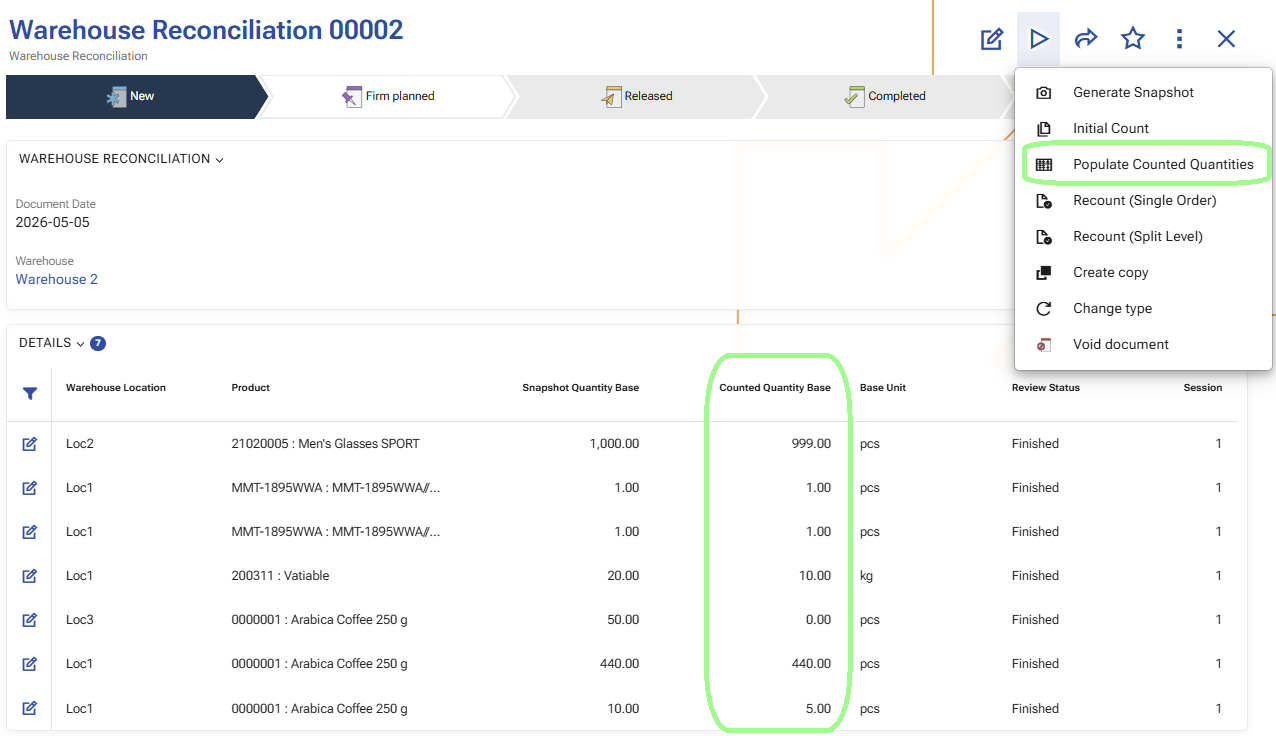
Use Populate Counted Quantities to update the reconciliation details with the latest counted result from the completed count session.
This operation reads the performed counts and aggregates them into the corresponding Warehouse Reconciliation Details. It is the step that turns the raw counting result into a reviewable reconciliation result.
When to use it
Use Populate Counted Quantities after count orders have been executed in WMS Worker and after the related reconciliation details for the current session have moved to Finished.
This operation is used after every counting iteration:
- after Initial Count;
- after Recount (Split Level);
- after Recount (Single Order).
What the operation uses as input
The operation uses:
- the current Warehouse Reconciliation;
- the existing Warehouse Reconciliation Details;
- the performed warehouse counts for the current counting session.
It works with the rows that belong to the current reconciliation and to the current counting session.
What the operation updates
For each reconciliation detail, the operation updates the counted result with the aggregated quantities from the performed counts.
The main updated fields are:
- CountedQuantityBase
- CountedQuantity
- LastAggregatedAt
How the aggregation works
The operation matches the performed counts to the reconciliation details by the same counted stock position.
The aggregation follows the detailed characteristics of the counted position, such as:
- warehouse location;
- product;
- variant;
- lot;
- serial number;
- logistic unit.
When several count records belong to the same reconciliation detail, their result is aggregated into that detail.
Finished rows with no counted records
If a reconciliation detail belongs to the completed counting session and its status is Finished, but there are no matching counted records for it in that session, the operation sets its counted result to zero.
In this case, the detail is updated with:
- CountedQuantityBase = 0
- CountedQuantity = 0
This means that the row was part of the completed counting cycle, but no quantity was counted for that position.
Counted positions that do not exist in the snapshot
If the performed counts contain a position that does not yet exist in the reconciliation details, the operation creates a new Warehouse Reconciliation Detail for it.
The new row is created with:
- the current Warehouse Reconciliation;
- the matching warehouse and tracking characteristics from the counted position;
- SnapshotQuantityBase = 0
- SnapshotQuantity = 0
- populated counted quantities from the aggregated count result.
This means the counted position was found during counting, but it was not part of the original snapshot.
What users should expect after the operation finishes
After Populate Counted Quantities is completed:
- the reconciliation details contain the latest counted result for the current session;
- finished rows with no counted result are shown with zero counted quantity;
- newly found counted positions that were not part of the snapshot can appear as new reconciliation rows;
- the reconciliation is ready for review and approval.
What changes in the reconciliation details
Populate Counted Quantities does not change the current Session or ReviewStatus of the reconciliation rows.
Instead, it updates the counted result for the current session by refreshing the counted quantities in the existing reconciliation details.
Note
For an overview of how Session and ReviewStatus change throughout the process, see Sessions and review statuses.
The next operation is usually Generate recount orders.