Generate recount orders
Use Generate recount orders to create new count orders for the reconciliation rows that need another verification.
This operation is used after the current counted result has been reviewed and some rows are not ready to be approved yet. Instead of accepting the current result, the user selects those rows and sends them to a new recount session.
Recount always works with detailed reconciliation rows. Unlike Initial Count, it does not generate location-based first-pass orders.
When to use it
Use Generate recount orders after:
- the current counting session has been completed in WMS Worker;
- the related reconciliation rows have moved to Finished;
- Populate Counted Quantities has refreshed the counted result;
- the user has reviewed the result and identified the rows that need another check.
At this stage, the selected rows already contain the current reconciliation result, and the user has decided that these rows must go through another counting cycle.
What the operation uses as input
The operation uses the selected Warehouse Reconciliation Details.
Only the selected rows are included in the next recount session.
These rows already define the exact stock positions that must be checked again, including the warehouse and tracking characteristics of that position.
What the operation creates
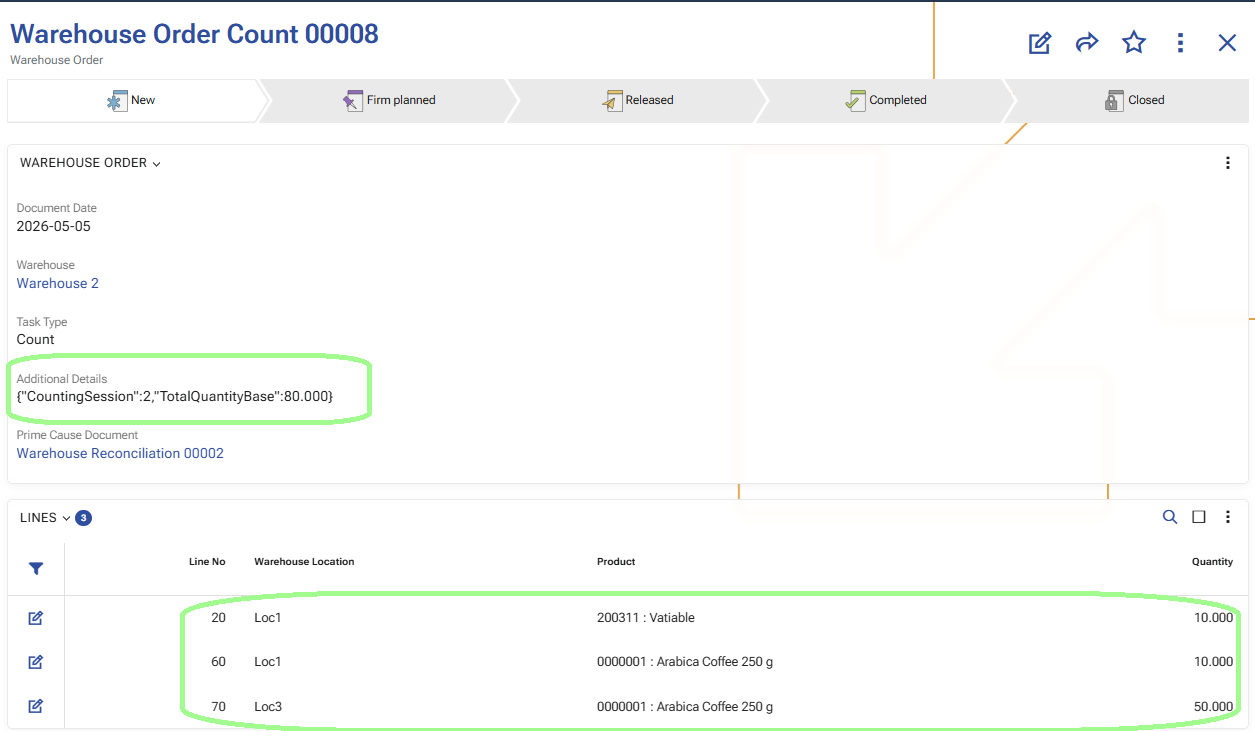
The system creates new Warehouse Orders with:
- TaskType = Count;
- the document type defined by CountingOrderDocumentType;
- Warehouse = Warehouse Reconciliation.Warehouse;
- Parent = Warehouse Reconciliation;
- DocumentDate = today;
- State = Planned.
The created orders belong to the next recount session.
How the recount lines are generated
Recount orders contain the exact reconciliation positions that were selected for recount.
Each included position can contain data such as:
- warehouse location;
- warehouse zone;
- product;
- variant;
- lot;
- serial number;
- logistic unit.
This means the worker does not recount the whole location again. The worker recounts the exact selected stock positions.
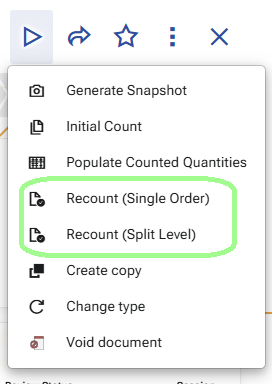
Recount (Single Order)
Use Recount (Single Order) when all selected rows must be sent together in one common recount order.
This option always creates one order for the selected recount rows.
It does not use split distribution by warehouse zones.
This option is suitable when the recount is small, targeted, or should be handled as one task.
Recount (Split Level)
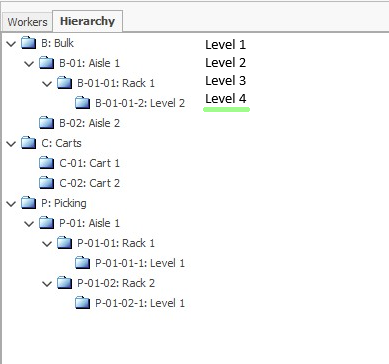
Use Recount (Split Level) when the recount must be distributed across multiple orders according to the configured warehouse zone split.
The split is controlled by the warehouse policy CountingSplitLevel.
- If CountingSplitLevel = 0 or is not defined, the recount remains in one order.
- If CountingSplitLevel is greater than
0, the recount orders are split by warehouse zones at the corresponding hierarchy level.
The generated distribution depends on:
- the configured warehouse zone hierarchy;
- the selected reconciliation rows;
- and the configured split level.
This option is suitable when the recount work must be distributed between workers or teams by zone.
What changes in the reconciliation details
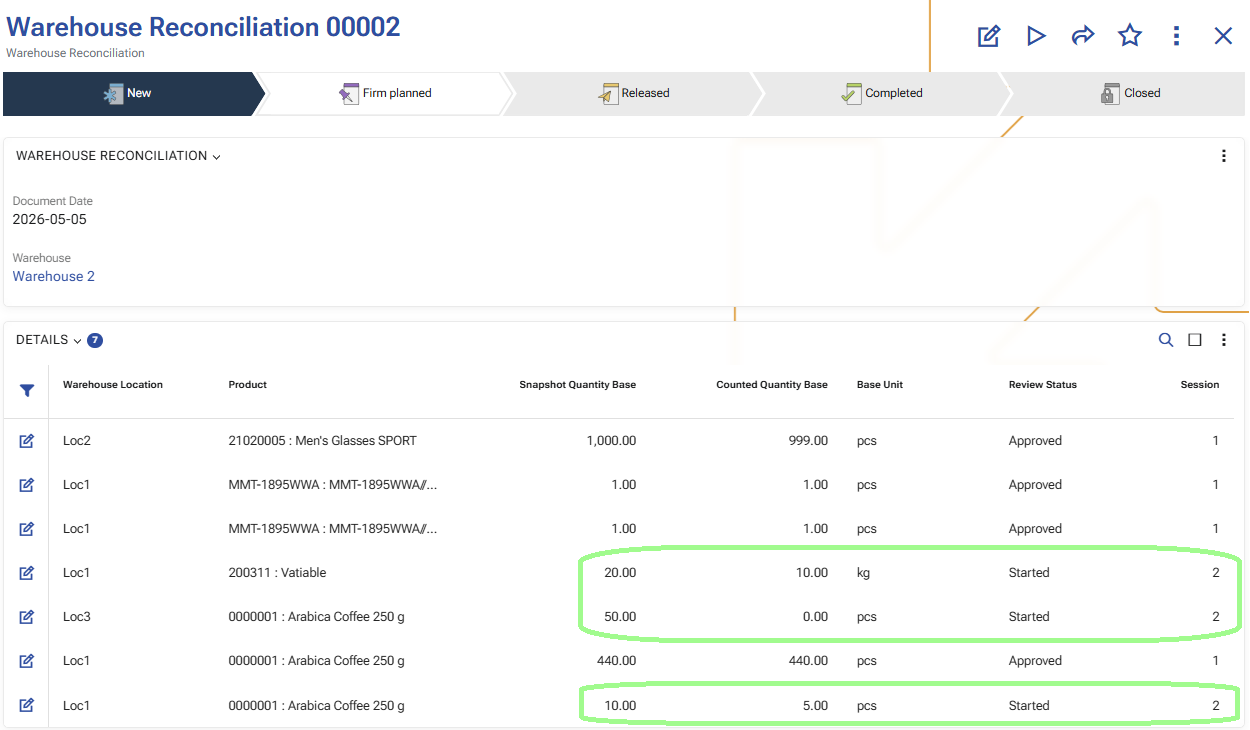
After the recount orders are generated, the selected reconciliation rows move to the new recount session.
Their status becomes Started for that new session.
This marks them as active rows in the next recount cycle.
Example
A manager reviews the current reconciliation result and selects several rows with differences that need another check.
If the recount must be distributed by warehouse zones, the manager uses Recount (Split Level).
If all selected rows should be checked together in one task, the manager uses Recount (Single Order).
In both cases, only the selected reconciliation rows are sent to the next recount session.
What users should expect after the operation finishes
After Generate recount orders is completed:
- new recount Warehouse Orders are created for the selected rows;
- the orders contain detailed stock positions for recount;
- the selected reconciliation rows move to the new recount session with status Started.
What changes in the reconciliation details
When Generate recount orders is used, only the selected reconciliation rows move to the next counting session.
For these rows:
- Session becomes the next session number
- ReviewStatus becomes Started
All other rows keep their current Session and ReviewStatus.
This marks only the selected rows as active in the new recount cycle.
Note
For an overview of how Session and ReviewStatus change throughout the process, see Sessions and review statuses.
The next operation is usually Execute count orders in WMS Worker.