Execute count orders in WMS Worker
Use WMS Worker to execute the generated count orders for the current reconciliation session.
This is the operational step where the warehouse worker performs the physical count and records the result. The recorded counts are later aggregated back into the reconciliation details.
When to use it
Use WMS Worker after count orders have already been generated from the reconciliation.
This applies to:
- the first counting session after Initial Count;
- every next counting session after Recount.
At this stage, the warehouse worker already has one or more planned count orders that belong to the current reconciliation.
What the worker opens
The worker opens WMS Worker and selects one of the generated count orders.
The user experience depends on how the order was created.
- Orders created by Initial Count are location-based.
- Orders created by Recount are detail-based.
This difference is important because the worker does not follow the same counting flow in both cases.
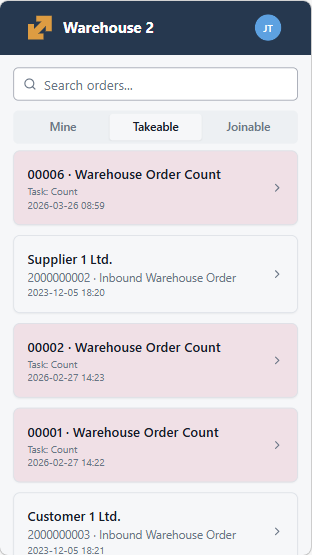
Initial Count execution
In Initial Count, the generated order lines represent the locations that must be counted.
The worker starts from the assigned warehouse location and performs the first physical count for that location.
At this stage, the order does not guide the worker through a predefined list of detailed product positions. Instead, the worker counts what is physically found at the location.
This makes Initial Count the broad first pass through the selected reconciliation scope.
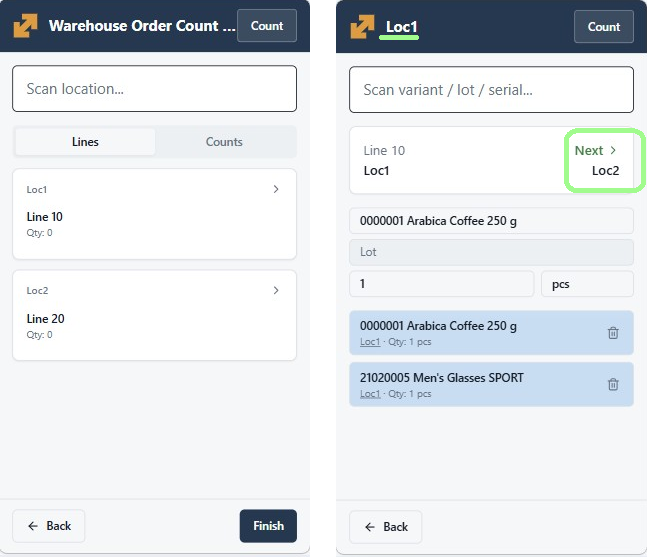
Recount execution
In Recount, the generated order already contains the exact positions that must be checked again.
The worker does not recount the whole location. Instead, the worker recounts the selected product positions and their tracked characteristics.
Depending on the counted position, this can include:
- product;
- warehouse location;
- logistic unit;
- lot;
- serial number;
- variant;
- and other tracking data when applicable.
This makes recount a focused verification step instead of a broad counting pass.
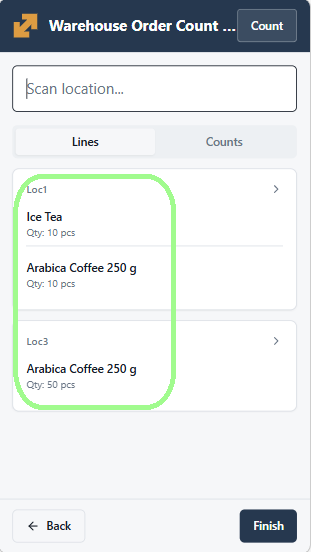
What the worker records
During execution, the worker records the counted result in WMS Worker.
Each performed count is stored as a count record for the current counting session.
The recorded result carries the counted stock position, including the warehouse and tracking characteristics that identify what was counted.
This means the reconciliation does not rely only on the final visible result in the order. It also keeps the raw counting records that are later used for aggregation.
How repeated counting works
A worker can record multiple counts during the same counting session.
The reconciliation result for the session is not taken directly from a single last action on the screen. Instead, the system later aggregates the count records for the session and updates the reconciliation details with the resulting counted quantities.
This is why the execution step and the later Populate Counted Quantities step are separate parts of the process.
What happens when the orders are completed
When the generated count orders for the current session are completed, the related reconciliation details move from Started to Finished.
This is an automatic system step for the current counting session.
It marks the rows as ready for aggregation and review.
What users should expect after the operation finishes
After the count orders are executed in WMS Worker:
- the performed counts are stored for the current session;
- the related reconciliation details move to Finished when the session orders are completed;
- the reconciliation is ready for Populate Counted Quantities.
From a user perspective, this is the step where the physical count is performed and the system receives the counting result for the current session.
A finished detail row is treated as completed for the current counting session.
If no counted records exist for a finished reconciliation detail in that session, the later aggregation step treats its counted result as zero.
This allows the reconciliation to distinguish between rows that are still in progress and rows that were completed but no quantity was found for them.
T### What changes in the reconciliation details
When the generated count orders for the current session are completed in WMS Worker, the related reconciliation rows move from:
- ReviewStatus = Started to
- ReviewStatus = Finished
This is an automatic transition for the current counting session and marks the rows as ready for count aggregation and review.
Note
For an overview of how Session and ReviewStatus change throughout the process, see Sessions and review statuses.
The next operation is usually Populate Counted Quantities.