Configuring Planned Reconcile
This page describes the setup required to use Planned Reconcile in WMS.
Before users start working with Planned Reconcile, prepare the required document types, warehouse policies, and warehouse zone structure.
Required setup
Configure the following:
- a document type for Warehouse Reconciliations;
- a document type for Warehouse Orders used for count orders;
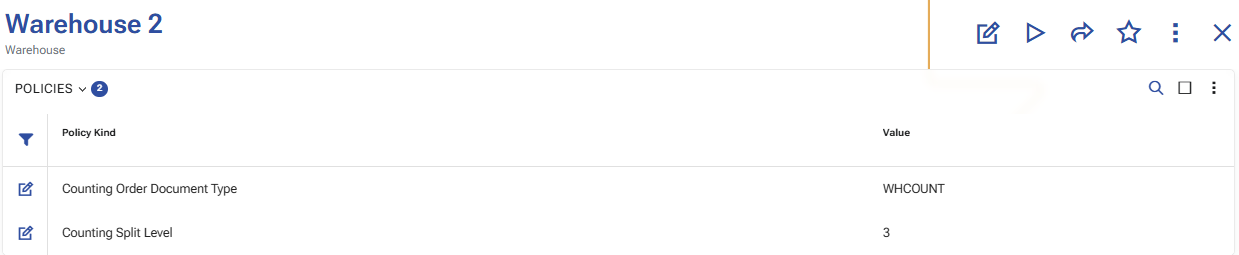
- the warehouse policy CountingOrderDocumentType;
- optionally, the warehouse policy CountingSplitLevel;
- the warehouse zone hierarchy, when count orders must be split by zones.
Document types
Create a document type for the entity Warehouse Reconciliations. This document type is used for the reconciliation document.
Create a document type for the entity Warehouse Orders. This document type is used for the generated count orders.
The document type for generated count orders is defined through the Warehouse policies, using the CountingOrderDocumentType policy.
Warehouse policies
Configure the CountingOrderDocumentType warehouse policy. Its value must be the DocumentType.Code of a document type for the entity Warehouse Orders.
Configure the CountingSplitLevel warehouse policy when count orders must be split by warehouse zones. Its value must be a non-negative integer.
Use the following values for CountingSplitLevel:
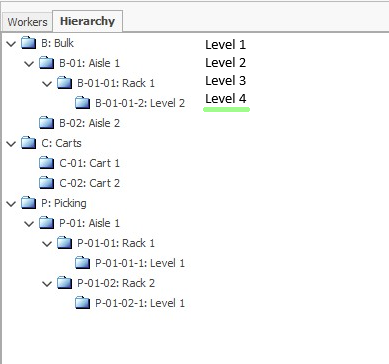
0for a single count order;- a value greater than
0to split count orders by warehouse zones at the corresponding hierarchy level.
Note
CountingSplitLevel is used only in scenarios that support split order generation. It does not apply to Recount (Single Order).
Warehouse zone hierarchy
When CountingSplitLevel is used, review the warehouse zone hierarchy in advance so that the split level matches the intended order distribution.
The generated count orders follow the configured zone hierarchy level.
Warehouse scope
Select the reconciliation scope in the warehouse:
- the whole warehouse;
- selected zones;
- selected locations.
When zones or locations are selected, use ones that belong to the selected warehouse.
Operational preparation
After the snapshot is generated, keep the selected scope free from warehouse movements until the counting and review are finished.
Do not perform warehouse movements for the selected locations and products during the reconciliation process.