System features
This section introduces new and improved ERP.net system capabilities that are not limited to a particular client or business module. These features extend how the platform stores, connects, validates, and makes data available. Where relevant, each update also explains how you can use it in the Desktop and Web clients.
1. Stored Attributes of Type Reference
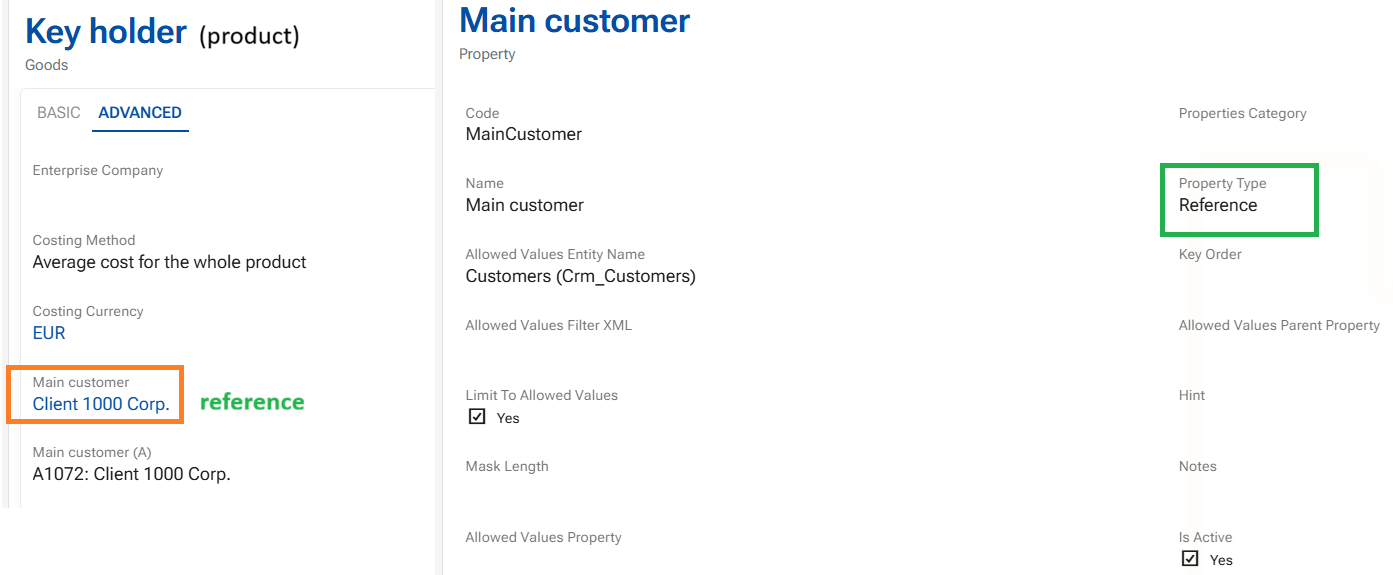
Stored attributes now support a new Reference type. It lets you link a record to a specific record elsewhere in ERP.net—for example, to select a Main customer for a product.
To create one, add a stored attribute, set its Property Type to Reference, and select the target repository in Allowed Values Entity Type. You can then select a value for the attribute in both the Desktop and Web clients.
How is this different from a Text attribute with entity-backed allowed values?
A Text attribute can also offer records from another repository as choices and may store the selected record’s ID. Those records, however, serve as the source of allowed values. With a Reference attribute, the selected record is treated as the object the attribute refers to. The record ID identifies the reference; its stored text is only a display representation, not the authoritative value. This reference visualized as a link, really links and leads to the exact record which can be opened and observed in WEB Client.
System Business rules help preserve the integrity of Reference attributes by validating their configuration and values. This makes references more reliable than depending on a displayed name, while giving users a familiar way to select linked records.
In the Web client, a Reference attribute can be selected from the entity’s system items when customizing a form—not only from the Stored Attributes section. The corresponding stored-attribute field, bears the suffix “(A)”, may also appear there - it is the text value of the reference. To change the selection, use the reference field.
Learn more from the dedicated page: User-defined references