Create project from template
Overview
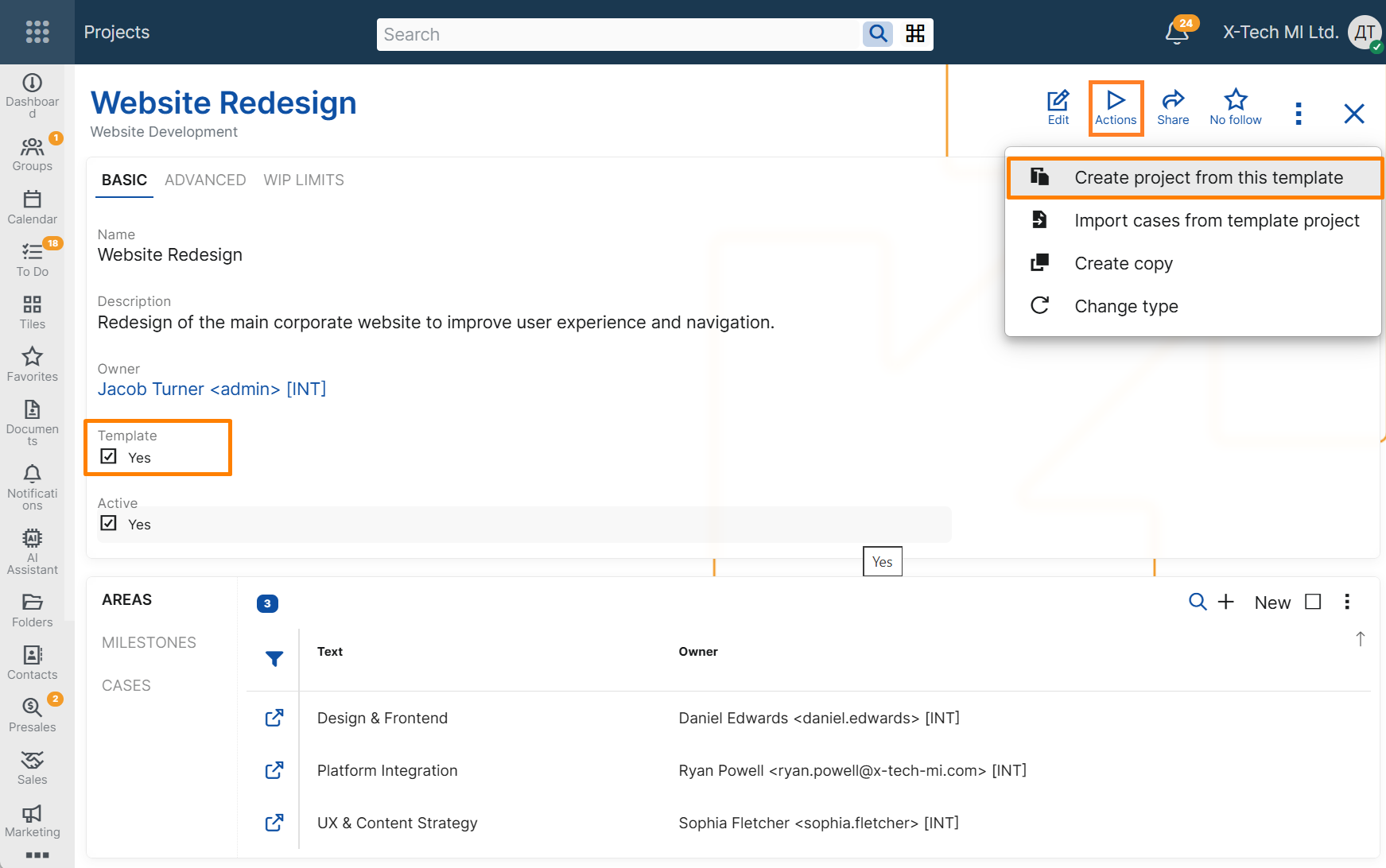
The Create project from this template UI function allows users to create a new Project based on an existing template Project.
This function is intended for recurring work that follows a standard project structure. Instead of setting up each new Project manually, users can start from a template Project and reuse its main configuration together with its initial set of Cases.
When the function is executed, the system creates a new active Project with a user-defined name. The new Project is created as a regular Project, not as a template. It also creates new Cases in the new Project by reusing the Cases from the template Project.
This helps teams reuse an existing project structure and prepare a new backlog more quickly.
Availability
The function is available from the Action button in two places:
- in the form of a single Project record;
- in the Projects navigator, when a Project record is selected.
It can be started from the UI for any Project, but it can only be executed for Projects that are marked as templates, i.e. Projects for which the Is Template option is enabled.
If the selected Project is not marked as a template, the system shows an error message and stops the execution.
The function is disabled while the Project is in edit mode.
Project data in the new Project
When a new Project is created from a template, it inherits the main setup of the template Project, including:
- Project Type
- Project Group
- Primary User
- Social Group
- Consider WIP Limit
- Ready WIP Limit
- In Progress WIP Limit
The following values are set when the new Project is created:
- its Name is entered by the user when the function is executed;
- Is Active is enabled;
- Is Template is disabled.
Some project-specific data is not copied from the template Project, including:
- Customer
- Access Key
- Description
Case data in the new Project
The function creates new Cases in the new Project based on the Cases in the template Project.
The new Cases preserve the main planning structure of the template Cases, including:
- Title
- Project Area
- Project Milestone
- Case Category
- Specification
- Estimated Time Hours
- Story Points
- Owner User
- Social Group
At the same time, the new Cases are initialized as new work items for the new Project. The following execution-specific data is reset:
- System State is set to Backlog;
- Assigned To User is cleared;
- User State is cleared;
- Sprint is cleared;
- Parent is cleared;
- Duplicate Of Case is cleared;
- Stakeholder Party is cleared;
- workflow timestamps from the original Cases are not copied;
- a new creation time is assigned.
This behavior allows the new Project to reuse the structure and planning data of the template without copying execution history from previous work.