Configuring promotional packages
Promotional packages are configured by defining:
- the products that ERP.net should add to the sales order, and
- the conditions under which the promotional package becomes eligible in a sales order.
A promotional package record defines a predefined combination of products. When the package is applied, ERP.net adds the configured products as separate sales order lines.
The configured applicability conditions determine in which sales order context the package is available for selection. If the conditions are not met, the package is not available in the sales order.
Define the package contents
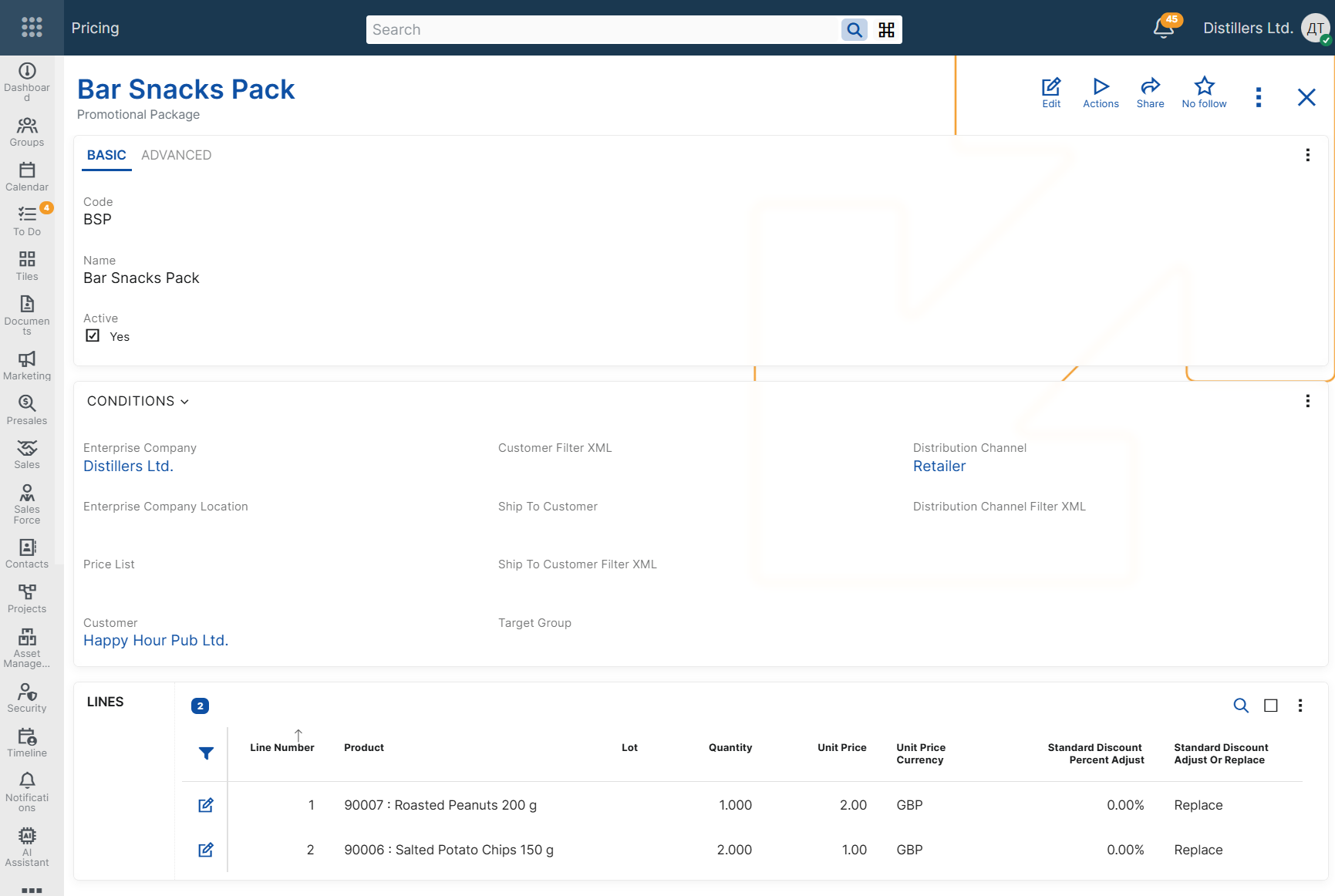
Every promotional package requires at least one package line.
Each package line always defines:
- Product - the product that will be added to the sales order when the package is applied.
- Quantity - the quantity of the product in one package.
Optionally, a package line can also define:
- Lot - the lot that will be assigned to the generated sales order line.
- Unit Price - the unit price to be applied to the generated sales order line.
- Unit Price Currency - the currency of the specified unit price.
- Standard Discount Percent Adjust - the discount percent adjustment to be applied to the generated sales order line.
- Standard Discount Adjust Or Replace - determines how the discount adjustment is applied.
Use only the fields that are needed for the business scenario. A package line can define only a product and quantity, or it can also define a unit price, a discount adjustment, or both.
The configured package lines determine which products are added to the sales order and how their quantities, lots, prices, and discounts are derived.
Standard discount adjustment
Use Standard Discount Percent Adjust and Standard Discount Adjust Or Replace when the package must also affect the standard line discount of the generated sales order lines.
ERP.net supports the following adjustment modes:
- Add - adds the specified discount percent to the current standard discount percent.
- Replace - replaces the current standard discount percent with the specified value.
- Mark Down - applies the specified discount percent after the current standard discount percent in cascade.
Use these settings only when the generated sales order lines must receive a specific discount behavior as part of the package.
Applicability conditions
In addition to the package line settings, a promotional package can include applicability conditions. These conditions determine in which sales order context the package can be considered.
Customer context
Use these conditions when the package must be available only for specific customers.
- Valid For Customer - limits the package to a specific customer.
- Valid For Target Group - limits the package to customers from the specified target group.
- Valid For Customer Filter XML - applies the package only when the customer matches the specified filter criteria.
Delivery context
Use these conditions when the package must depend on the ship-to customer in the sales order.
- Valid For Ship To Customer - limits the package to a specific ship-to customer.
- Valid for Ship To Customer Filter XML - applies the package only when the ship-to customer matches the specified filter criteria.
Commercial context
Use these conditions when the package must depend on the commercial setup of the sales order.
- Valid For Price List - limits the package to sales orders that use a specific price list.
- Valid For Distribution Channel - limits the package to sales orders in a specific distribution channel.
- Valid For Distribution Channel Filter XML - applies the package only when the distribution channel matches the specified filter criteria.
Organizational context
Use these conditions when the promotional package depends on the organizational context of the sales order.
- Enterprise Company - limits the package to sales orders issued from a specific enterprise company.
- Enterprise Company Location - limits the package to sales orders issued from a specific enterprise company location.
Note
If Enterprise Company is specified in the promotional package, the products in the package lines must belong to the same enterprise company, unless the product has no enterprise company.
Validity context
Use these conditions when the package must be available only during a specific period or only while the record is enabled.
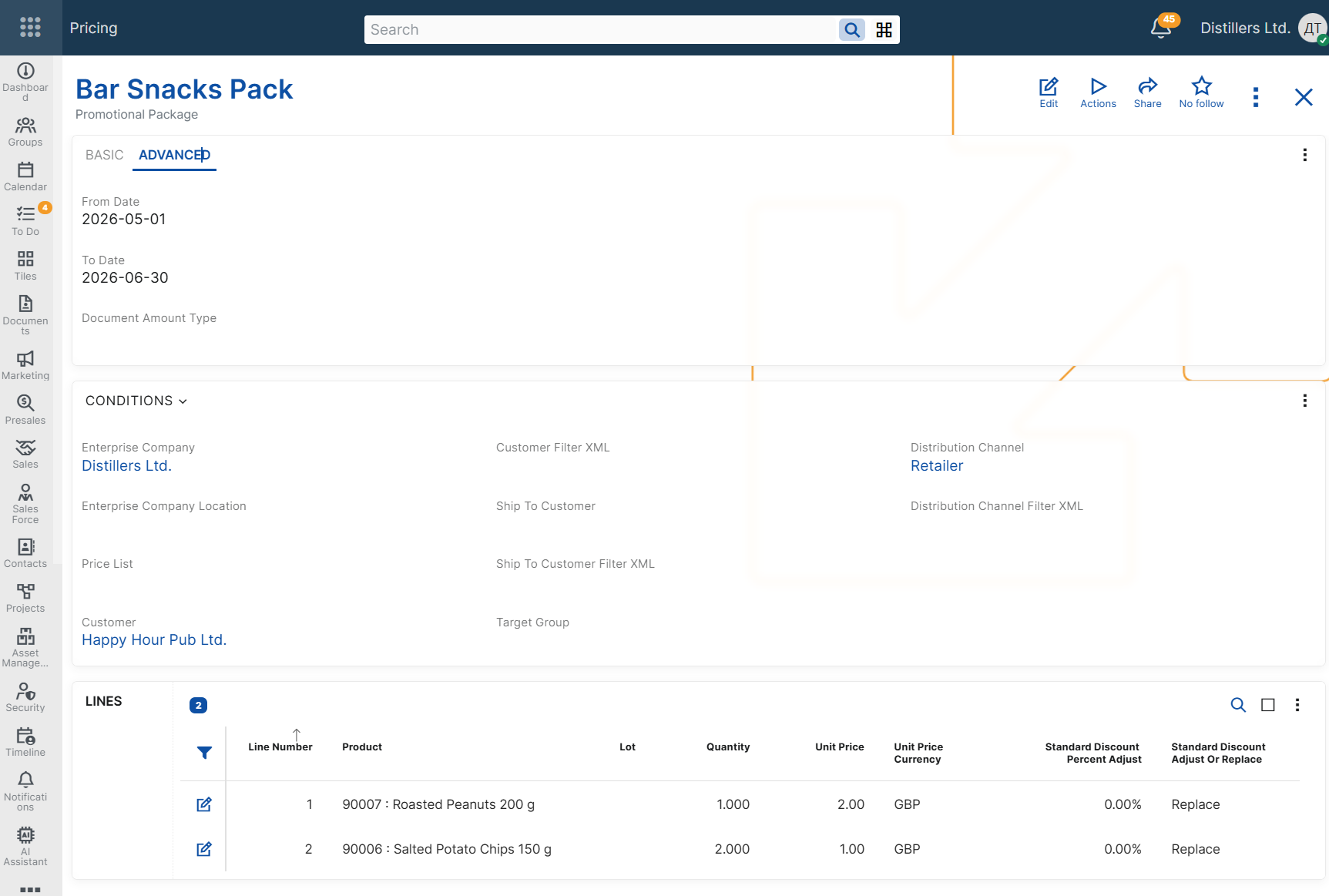
- Valid From Date - limits the promotional package to sales orders for which the context Date is on or after this date.
- Valid To Date - limits the promotional package to sales orders for which the context Date is on or before this date.
- Active - indicates whether the promotional package is enabled for use.
Document amount categorization
The Document Amount Type field specifies the document amount category for the discount effect of the promotional package line.
When a promotional package line applies a discount adjustment and a Document Amount Type is specified, ERP.net records the corresponding discount amount as a document amount and distributes it to the affected sales order line. This enables separate tracking of promotional-package discount amounts for reporting and posting purposes.
This field is used only for categorization and recording of the applied discount amount. It does not participate in the promotional package determination logic and does not affect package applicability.
For more information about document amounts, see Additional amounts and Additional amounts determination and recording.
Matching configured conditions
A promotional package is available for selection only when the values in the sales order match the configured applicability conditions.
If a promotional package contains multiple applicability conditions, all of them must match for the package to be considered.
For example, a package configured for a specific customer and price list is considered only when both the customer and the price list in the sales order match the configured values.
Example scenarios
The following examples show how promotional packages can be configured for different business needs and how the configured conditions affect the sales order.
Note
Each example shows only the conditions relevant to the scenario. All other promotional package conditions are assumed to be satisfied.
Note
In the following examples, Sales order context shows the sales order values and the selected promotional package. The generated sales order lines are shown in Result.
Package with products and quantities only
Use this scenario when the package should add a predefined combination of products without changing their prices or discounts.
Example configuration
Promotional Package: Package A
Package Line 1
Product: Product A
Quantity: 1
Package Line 2
Product: Product B
Quantity: 2
Sales order context
Customer: Customer A
In the Promotional Packages panel, Package A is available for selection.
Promotional Package: Package A
Number Of Packages: 1
Result
Promotional Package: Package A
The following sales order lines are added.
Line No: 10
Product: Product A
Quantity: 1
Line No: 20
Product: Product B
Quantity: 2
Package with unit prices
Use this scenario when the package should also define the unit prices of the generated sales order lines.
Example configuration
Promotional Package: Package A
Package Line 1
Product: Product A
Quantity: 1
Unit Price: 10.00
Unit Price Currency: GBP
Package Line 2
Product: Product B
Quantity: 2
Unit Price: 5.00
Unit Price Currency: GBP
Sales order context
Customer: Customer A
In the Promotional Packages panel, Package A is available for selection.
Promotional Package: Package A
Number Of Packages: 1
Result
Promotional Package: Package A
The following sales order lines are added.
Line No: 10
Product: Product A
Quantity: 1
Unit Price: 10.00 GBP
Line No: 20
Product: Product B
Quantity: 2
Unit Price: 5.00 GBP
Package for a specific customer and price list
Use this scenario when the package should be available only for a specific customer and only when a specific price list is used.
Example configuration
Promotional Package: Package A
Valid For Customer: Customer A
Valid For Price List: Price List A
Package Line 1
Product: Product A
Quantity: 1
Package Line 2
Product: Product B
Quantity: 1
Sales order context
Customer: Customer A
Price List: Price List A
In the Promotional Packages panel, Package A is available for selection.
Promotional Package: Package A
Number Of Packages: 1
Result
Promotional Package: Package A
The configured products are added as separate sales order lines.
Package with quantity multiplication
Use this scenario when the same package must be sold more than once in the same sales order.
Example configuration
Promotional Package: Package A
Package Line 1
Product: Product A
Quantity: 1
Package Line 2
Product: Product B
Quantity: 2
Sales order context
Customer: Customer A
In the Promotional Packages panel, Package A is available for selection.
Promotional Package: Package A
Number Of Packages: 3
Result
Promotional Package: Package A
The following sales order lines are added.
Line No: 10
Product: Product A
Quantity: 3
Line No: 20
Product: Product B
Quantity: 6
Package with standard discount adjustment
Use this scenario when the package should also affect the standard line discount of the generated sales order lines.
Example configuration
Promotional Package: Package A
Package Line 1
Product: Product A
Quantity: 1
Standard Discount Percent Adjust: 10
Standard Discount Adjust Or Replace: Replace
Sales order context
Customer: Customer A
In the Promotional Packages panel, Package A is available for selection.
Promotional Package: Package A
Number Of Packages: 1
Result
Promotional Package: Package A
The following sales order line is added.
Line No: 10
Product: Product A
Quantity: 1
Line Standard Discount Percent: 10%
Time-limited package
Use this scenario when a promotional package must be available only during a specific period.
Example configuration
Promotional Package: Package A
Valid From Date: 2026-06-01
Valid To Date: 2026-06-30
Package Line 1
Product: Product A
Quantity: 1
Sales order context
Required Delivery Date: 2026-06-15
In the Promotional Packages panel, Package A is available for selection.
Promotional Package: Package A
Number Of Packages: 1
Result
Promotional Package: Package A
The package is available for selection and can be applied in the sales order.
Negative examples
The following examples show cases in which a promotional package is not available because the sales order context does not match the configured applicability conditions.
Customer mismatch
Use this scenario to show that a customer-specific promotional package is not available for a different customer.
Example configuration
Promotional Package: Package A
Valid For Customer: Customer A
Package Line 1
Product: Product A
Quantity: 1
Sales order context
Customer: Customer B
In the Promotional Packages panel, Package A is not available for selection.
Result
This promotional package is not available for selection.
Price list mismatch
Use this scenario to show that a price-list-specific promotional package is not available when a different price list is used.
Example configuration
Promotional Package: Package A
Valid For Price List: Price List A
Package Line 1
Product: Product A
Quantity: 1
Sales order context
Customer: Customer A
Price List: Price List B
In the Promotional Packages panel, Package A is not available for selection.
Result
This promotional package is not available for selection.
Date outside validity period
Use this scenario to show that a time-limited promotional package is not available outside its configured validity period.
Example configuration
Promotional Package: Package A
Valid From Date: 2026-06-01
Valid To Date: 2026-06-30
Package Line 1
Product: Product A
Quantity: 1
Sales order context
Required Delivery Date: 2026-07-05
In the Promotional Packages panel, Package A is not available for selection.
Result
This promotional package is not available for selection.